
Titan is displayed within 3 frames; one along the top of the screen in which the background image top.gif is used, one down the left hand side of the screen in which the background image left.gif is used, and the main screen, in which the background image right.gif is used. These images can be replaced with your own designs or replaced with a flat colour; this is covered in more depth in the Background Images section.
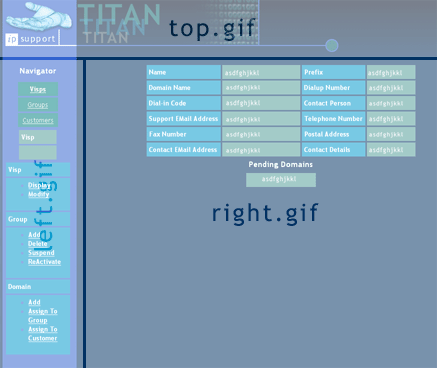
Information in Titan is displayed in tables; the navigation system is contained in the left hand frame, and the information/input section is displayed in the right hand frame. For ease of branding, four colours are used as background colours for table cells throughout the system; these are referred to as Colour1 through to Colour4 in this document.